


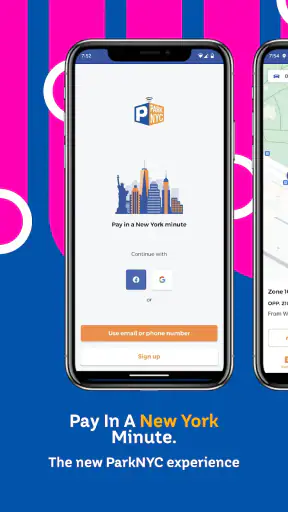
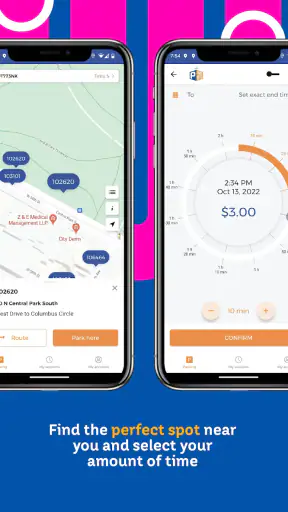
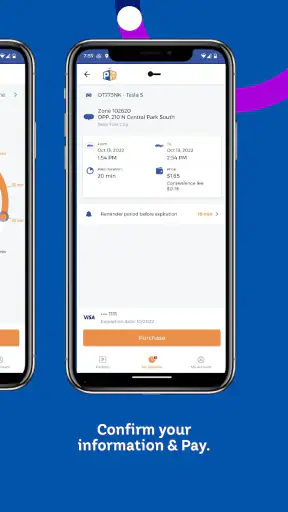
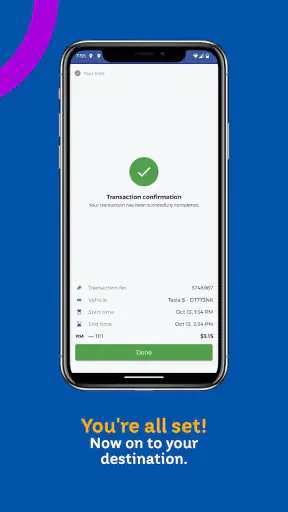
Parking in New York can turn a simple errand into a small logistics exercise. You find a space, check the sign, look for a meter, and then wonder whether you have enough coins or time left on a paper receipt. ParkNYC powered by Flowbird is designed to remove much of that friction. It is a free Travel & Local app from NYCDOT ITT that lets drivers pay for eligible New York City parking from a phone rather than relying on a physical meter.
I found the app most useful when I treated it as a parking companion rather than a complete navigation tool. It does not make finding a space easier, and it cannot change the rules on the street. What it can do is make the payment step more manageable, especially when I am already parked and do not want to walk to a meter in bad weather or leave a conversation to search for change. That distinction matters: the app is practical because it handles one specific part of parking well, not because it solves every parking problem.
How ParkNYC fits into a normal New York parking routine
The basic workflow is straightforward. After parking in a location where ParkNYC is accepted, I use the app to identify the parking area, choose the relevant session, and complete payment on the phone. The important habit is to check the signs before doing anything in the app. The street sign remains the authority for hours, restrictions, alternate-side rules, and other conditions. ParkNYC is a payment tool, not permission to park wherever a phone session can be started.
That may sound obvious, but it is the difference between a useful digital meter and a costly misunderstanding. A driver who selects the wrong zone can pay successfully and still be parked illegally. I recommend comparing the zone shown in the app with the location information on the nearest sign, especially on a long block or near an intersection where parking rules can change quickly.
For an everyday example, imagine stopping in Manhattan for a short appointment. Instead of searching for a meter, I can park, read the sign, open ParkNYC, and start the appropriate session while standing beside the car. If the appointment runs longer, the phone gives me a way to manage the session without returning to the vehicle, provided the local rules and the session itself allow that action. This is where the app feels more convenient than the traditional meter: it keeps the payment task with me rather than tying it to a particular machine.
The app also makes sense for people who regularly drive into the city but do not want to carry coins or handle a public touchscreen. It is especially helpful for visitors using a rental car, commuters who move between neighborhoods, and drivers who prefer keeping parking activity on a phone. On the other hand, someone who rarely parks in areas covered by the service may find that a normal meter or another accepted payment method is less effort than setting up and learning a dedicated app.
What I noticed about the current experience
ParkNYC has a focused purpose, and that focus is one of its strengths. The interface is built around getting a parking session started rather than surrounding the payment process with unrelated travel features. I appreciate that because parking is usually something I want to finish quickly. The less time I spend navigating menus beside a busy street, the better.
There is still a small mental checklist to follow. I need to confirm the vehicle, location, parking rules, and session details before paying. A phone app can make payment fast, but it also makes it easy to tap through a choice without looking carefully. My best practice is to pause at the confirmation screen and compare the zone with the sign one more time. That extra moment is more valuable than rushing into a session that does not match the space.
The app belongs in the same practical category as other city parking payment tools, but it is not interchangeable with a navigation app, a map, or a general transit planner. Those alternatives may help me reach a destination or compare transportation options, while ParkNYC addresses the final payment step after I have already chosen to drive and found a legal space. If my main problem is locating available parking, I need a different tool or a broader plan. If my problem is paying once I am parked, this app is much more directly relevant.
Who operates it and what its current status suggests
ParkNYC is developed by NYCDOT ITT, which gives the app a clear connection to New York City’s transportation environment. It is not presented as a general-purpose parking service for every city. That local focus is important: the app is most useful when my trip is actually within the parts of New York where ParkNYC payment is accepted.
The app has a 4.7 average from around 54 thousand ratings and more than a million installs. Those figures suggest that it has become a familiar option for a substantial group of drivers, although popularity should not replace checking whether a particular block supports it. A strong rating is encouraging, but a parking app still has to be judged at street level, where signs, zones, and local restrictions determine whether the session is appropriate.
It is free to install and carries an Everyone age rating, so the main barrier is not the download price. The real question is whether it fits my parking habits. A person who drives into New York several times a month can gain meaningful convenience from having it ready. Someone who visits once and already has an accepted payment method may prefer not to add another app to the phone.
What the version and release history tell me
The app was released on December 16, 2016, and the current version is 2.2. That history gives ParkNYC the feel of an established service rather than a brand-new experiment. I see the version number as evidence of a product that has had time to settle into its role, but not as a promise that every modern parking expectation has been addressed.
Its minimum operating-system requirement is 7.1, which makes the compatibility threshold relatively broad for people using older supported devices. That can be useful for drivers who keep an older phone in the car or who do not replace their handset frequently. At the same time, compatibility alone does not guarantee a smooth experience on every device. A dependable connection, a charged phone, and access to the account or payment setup still matter when I am standing at the curb.
The version history is also a reminder to separate confirmed product changes from future hopes. I would like any future development to preserve the app’s quick payment flow while improving clarity around zones, session status, and reminders. Those are sensible areas to watch, but they should not be treated as existing capabilities unless the app clearly provides them in the version I am using.
How it affects people who already use it
For an existing user, the biggest benefit is habit. Once ParkNYC is part of my parking routine, I do not have to rethink payment every time I enter the city. I can keep the app available, check the street information, and complete the transaction from the same place. That consistency is more valuable than a flashy feature because parking decisions often happen under time pressure.
Regular users should still avoid becoming too automatic. Familiarity can create its own risk: I may assume that a nearby block uses the same zone or that a previous parking rule still applies. I find the app works best when it handles payment while I continue to treat the physical signs as the source of truth. The phone reduces walking and cash handling; it does not replace attention.
Another useful workflow is to prepare before reaching the destination. I can make sure the app is installed, the account is accessible, and the phone has enough battery before entering a crowded area. That preparation sounds minor, but it prevents the most frustrating version of the experience: arriving at a legal space and discovering that the payment step is delayed by a forgotten login, weak connectivity, or a nearly empty battery.
Drivers who switch between multiple vehicles should be particularly careful during setup and payment. The convenience of a saved vehicle or familiar account can become a liability if I do not confirm that the selected vehicle matches the one I am actually driving. I consider that one of the less obvious trade-offs of digital parking: it reduces repetitive typing, but it increases the importance of checking saved details.
Where the app still leaves work to the driver
ParkNYC cannot remove the uncertainty that comes with New York street parking. I still need to interpret signs, watch for temporary restrictions, and decide whether a space is legal. A meter would not solve those issues either, but a phone payment can create a false sense of security because the transaction feels official. A successful payment is not the same as a valid parking decision.
The app is also not the right choice for every situation. If I am in a location that does not accept ParkNYC, the app cannot substitute for the payment method required there. If I need route planning, live traffic context, or public-transit directions, a broader travel app is a better companion. And if I am uncomfortable depending on a phone at the curb, I may prefer a physical meter or another available method when the location offers one.
Connectivity and battery are practical weaknesses for any mobile payment workflow. I would not begin a long drive with the assumption that a weak signal or low battery will somehow resolve itself when I park. Carrying a charger and checking the session confirmation are sensible precautions. The app can simplify payment, but it also moves responsibility from a public machine to my own device.
There is a human-factors issue as well. A driver may be tempted to operate the phone while moving or while distracted by traffic. I would only use it after parking safely, and I would finish the setup before stepping into a busy roadway or standing in an unsafe position. The few seconds saved by rushing are not worth creating a driving or pedestrian hazard.
Three details that make a real difference
First, I treat zone verification as a two-source check: the app and the nearest sign must agree. This is more reliable than selecting the first location that looks familiar. It is particularly important when a block crosses a boundary or when I have parked near a corner and the closest sign belongs to a different section.
Second, I take a screenshot or otherwise retain the confirmation information when the session begins, while respecting the app’s own design and my device settings. I do this not because the app is inherently unreliable, but because a record helps me remember the selected session and gives me something to review if I later question the end time or vehicle choice. I never treat a screenshot as a replacement for following the actual parking rules.
Third, I build a short departure check into my routine. Before walking away, I confirm the vehicle, location, and session status. Before leaving the area, I check whether the session needs to be ended or whether the local terms handle its duration differently. This prevents a common digital-payment mistake: assuming that starting a session automatically means I have understood every timing detail.
A fourth practical insight is to use the app as part of a backup plan, not as the only plan. I keep my phone charged and know what I will do if the app cannot load. That might mean locating an accepted meter or another permitted payment route. The best mobile tool is still only one part of a street-level parking strategy.
What I would like to see next
Future updates should concentrate on reducing ambiguity rather than adding unrelated extras. Clearer visual separation between the selected zone, the vehicle, and the session duration would help prevent mistakes. Stronger reminders around session status could also benefit drivers who park during a hectic day and then lose track of the original transaction.
I would also watch how the app handles the balance between speed and explanation. Parking rules can be complicated, but placing too much information in the payment flow could make the app slower to use. The ideal improvement would be concise, location-relevant guidance that supports the street signs without pretending to replace them.
Because the current version is 2.2, I would judge future changes by whether they improve reliability and confidence for ordinary users. A redesign is only valuable if I can complete a correct payment more easily than before. New options that make the app feel busier would matter less to me than a clear confirmation, dependable session management, and an interface that remains readable when I am outside in bright light or moving quickly between errands.
My recommendation for different kinds of drivers
I recommend ParkNYC to regular New York drivers who frequently encounter eligible paid parking and want a convenient alternative to walking to a meter. It is also a sensible app to have ready before a city visit, particularly when I expect to make several short stops and do not want each payment to become a separate hunt for coins or a machine.
I would be more cautious about recommending it to someone who parks only once, dislikes mobile accounts, or expects the app to find a space and explain every restriction automatically. That person may be better served by a simple meter, another accepted payment method, or a broader travel app combined with careful reading of the signs.
My overall view is positive because the app stays close to a real problem: paying for eligible New York parking without depending entirely on a physical meter. Its strongest qualities are convenience, local focus, and a workflow that can become quick once I understand it. Its limitations are equally clear: I remain responsible for legality, location, timing, connectivity, and device readiness.
ParkNYC is worth keeping on my phone when I regularly park in New York City, but I use it with the signs rather than instead of them. That is the honest value of the app. It can make the payment part of parking noticeably easier, while the judgment about where, when, and how long to park still belongs to me.


